The Multi-Location Challenge
Single-location GBP optimization is manageable. You fill out the fields, upload photos, respond to reviews, and settle into a maintenance rhythm. Multi-location management is a fundamentally different problem. You are dealing with inconsistent branding across listings, duplicate or unclaimed locations, the logistics of pushing bulk updates without introducing errors, and keeping review response times from slipping when 30 locations are generating reviews every single day.
There is also a newer pressure that did not exist a couple of years ago. Google's AI systems, and AI search tools like Perplexity and ChatGPT, now cross-verify business information across multiple platforms before surfacing results for local queries. According to Moz's 2024 Local Search Ranking Factors analysis, over 70% of local ranking signals now derive from cross-platform entity verification. For multi-location businesses, inconsistencies across listings do not just hurt individual locations. They create data conflicts that undermine the brand entity's credibility at a system level.
Most multi-location businesses are stuck in a reactive cycle. Someone notices a listing has the wrong hours, they fix it, and three weeks later another location has the same problem. The framework below is designed to break that cycle before it becomes the default way your team operates.
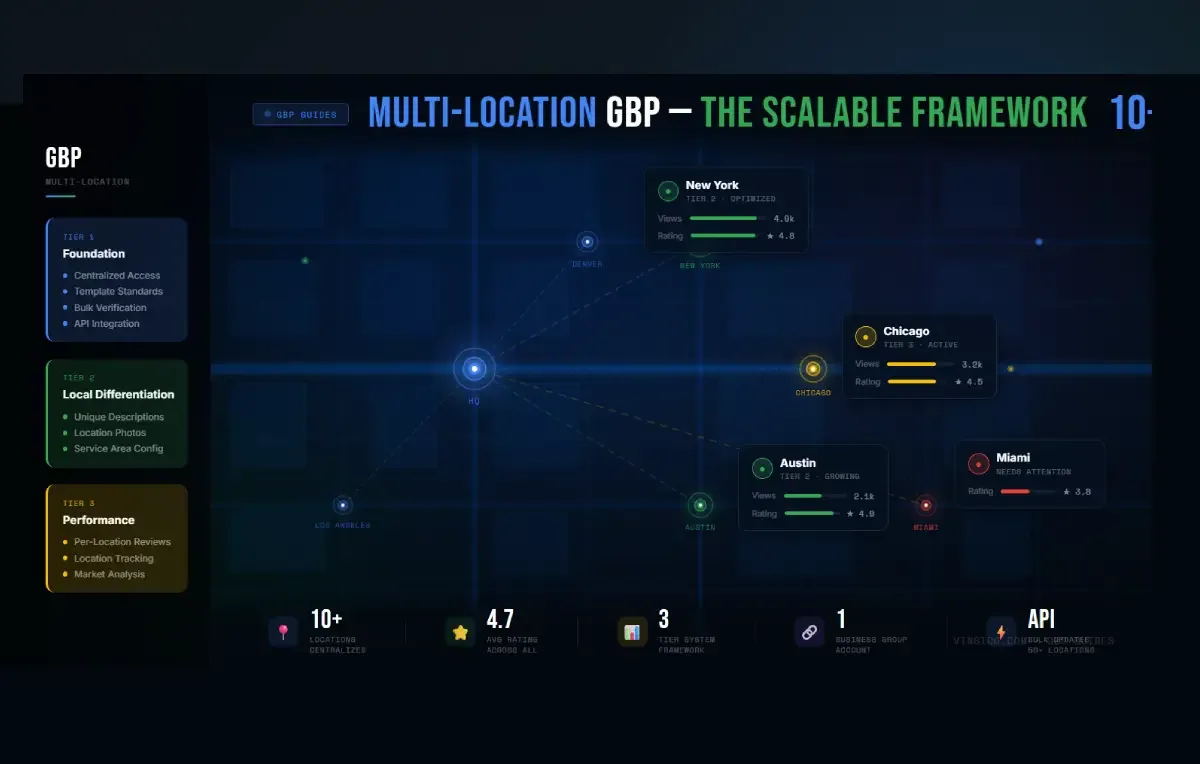
Tier 1: Foundation (All Locations)
Centralized access through a Business Group account. The most common and damaging mistake multi-location businesses make is letting individual store managers claim listings with personal email accounts. It works fine until that person leaves. Then you lose access to a verified listing and spend weeks trying to reclaim it. The correct setup is one top-level Business Group account with multiple users assigned role-based permissions. Owners, managers, and site managers each have different access levels. Use them properly from day one.
Template standardization for descriptions, hours, and photos. Your Denver location and your Austin location should not read as if they were written by different companies. Build a master template covering description structure, hours formatting, photo standards, and tone. The brand voice should be consistent across every listing. The local details, the neighborhood references, nearby landmarks, location-specific services, should be unique to each. More on that in Tier 2.
Bulk verification for brick-and-mortar chains. If you have 10 or more physical locations of the same brand, Google offers bulk verification through Business Profile Manager. Instead of going through individual verification for each location, you create a Business Group, submit a spreadsheet with all location data, and request chain verification under the Verifications tab. Once approved, new locations added to the group are typically verified automatically without repeating the process.
Two things the standard guides tend to leave out. First, service area businesses (plumbers, electricians, mobile services, businesses without a physical storefront) are not eligible for bulk verification. Each location must be verified individually. Second, Google now sometimes requires video verification as part of the bulk approval process, where an authorized representative must be physically present at one of the business locations either for a live video call or to record and upload footage. Have that process planned before you submit the request.
API integration for 50+ locations. At scale, the Google Business Profile API moves from a nice-to-have to a practical necessity. It allows you to push listing updates programmatically across all locations, pull review data into your CRM, automate special hours updates during holidays, and receive performance signals by location. The API was last updated in February 2026 and remains the most reliable mechanism for bulk data management at enterprise scale. There is a development overhead to set it up correctly, but for large multi-location operations, the time savings compound fast.
Tier 2: Local Differentiation
This is where most multi-location businesses lose the most ground. The standard approach is to write one description, copy it to every listing, and move on. Google can detect this, and customers can feel it. Identical content across dozens of listings also weakens how AI systems characterize your individual locations, since there is nothing location-specific for them to work with.
Write unique descriptions for each location. Reference the neighborhood, nearby landmarks, local transit, and any services or features specific to that location. If your downtown location offers parking validation and your suburban one has a drive-through, those details belong in the description. If a location serves a predominantly Spanish-speaking area, a bilingual description is worth considering. The description should make it clear to both Google and the customer that this is a specific, real place, not a template with the address swapped out.
Upload location-specific photos. Stock photos and corporate imagery reused across every listing are a missed opportunity at best and a credibility signal at worst. Customers want to see what the actual location looks like. Exterior shots, the interior, the team at that specific location. Google's own guidelines are clear that photos should represent the actual place of business. Location-specific visual content also performs better in the story-format review display Google rolled out across Maps in 2025.
Use multi-location posting natively. Google added a multi-location publishing feature in late 2025 that lets you create a post once and select specific locations to publish it to simultaneously. For brand-wide announcements or promotions, use this. For local events, community partnerships, or location-specific offers, write posts that mention local context. A generic corporate post pushed identically to every location tells the algorithm nothing about the individual listing's local relevance.
Customize service areas where they differ. A plumbing company's downtown branch likely serves different neighborhoods than its suburban one. Set each location's service area to reflect reality, using city names rather than zip codes for broader coverage.
Tier 3: Performance Optimization
Per-location review management. Assign review response responsibility at the location or regional level. Centralized review response works for smaller operations, but past 15 to 20 locations you need people who know the local context responding to reviews. A generic corporate response to a complaint about a specific location's parking situation is obvious to anyone reading it, and it signals to Google that engagement is automated rather than genuine.
Track performance at the location level, not just the brand level. GBP Insights now provides real-time data on searches, profile views, direction requests, website clicks, and calls per location. If one location is consistently underperforming against comparable ones, it warrants a direct investigation. The cause is usually one of four things: a category mismatch, a review volume gap, an incomplete listing, or a competitive market that needs more aggressive local signals.
Competitive analysis per market. Each location competes in a distinct local environment. What works in a midsize city with low competition does not translate to a dense urban market where 15 competitors have fully optimized listings. Run a local pack analysis for each location's primary keyword at minimum once a quarter. Category choices that are correct in one market may be suboptimal in another.
Tools Worth Knowing
For businesses that want multi-location GBP management handled properly rather than cobbled together, InQik is worth a serious look. It is a GBP managed service platform built specifically for this kind of work: centralized listing management, AI-powered review management across locations, performance reporting by location, and the category and optimization audit work that most businesses only think about when rankings drop. For teams that cannot justify the overhead of managing dozens of listings in-house, or agencies looking for a white-label option, it covers the full stack rather than just one slice of it.
For rank tracking and local search visibility reporting across multiple locations, BrightLocal remains a widely used option. For category research and competitor category analysis, pleper.com and the GMB Everywhere Chrome extension are both worth having.
Getting It Right
Multi-location GBP management is fundamentally a systems problem. The businesses that do it well are not doing more work; they have better processes, cleaner access controls, and a clear division between what should be standardized and what should be localized. Build the infrastructure from the start, customize at the location level where it matters, and set up tracking that tells you where to put the effort. That is the whole framework.