Why Category Selection Matters So Much
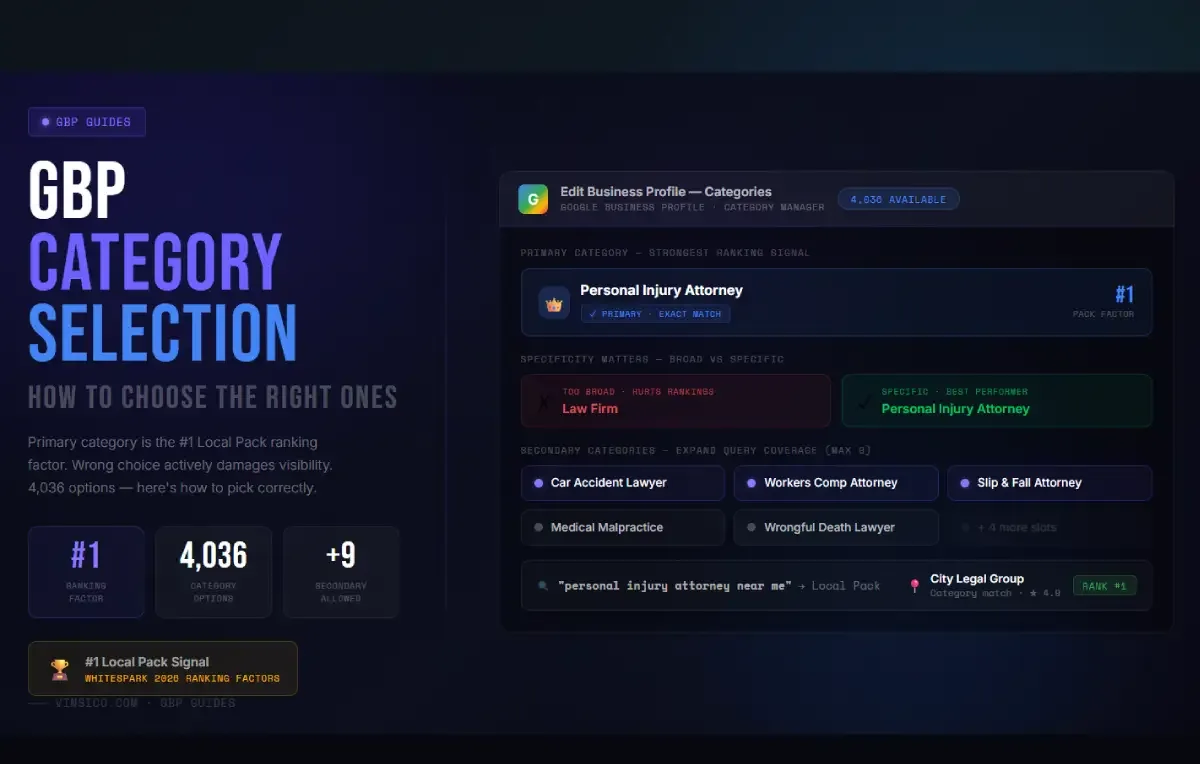
Your GBP primary category is the single strongest signal Google uses to decide which searches your business appears for. According to Whitespark's 2026 Local Search Ranking Factors report, compiled from 47 of the world's top local SEO experts and published in November 2025, primary GBP category ranked as the number one factor influencing Local Pack rankings. Not top three. Number one.
The same report added a sobering counterpoint: choosing the wrong primary category is the number two negative ranking factor, with a penalty score of 214 out of a possible maximum. That means an incorrect category does not just fail to help you, it actively damages your visibility.
For 2026 there is another layer worth knowing. Google's AI-powered search results, including AI Overviews, now use GBP category data to understand what a business does and generate conversational answers to local queries. A well-chosen category makes it more likely your business is accurately described and surfaced in those AI-generated responses. Category accuracy has always mattered. Now it matters in two separate systems simultaneously.
Despite all of this, most businesses choose their category during initial GBP setup, spend about thirty seconds on it, and never look at it again. That is worth fixing.
Choosing Your Primary Category
Be as specific as the list allows. As of December 2025, Google's category database contains exactly 4,036 options, and it is updated monthly. Google offers both broad categories and highly specific ones. In almost every case, the specific category outperforms the broader one for searches that actually convert. A business categorized as "Italian Restaurant" has a clear advantage over one categorized as "Restaurant" when someone searches "Italian restaurant near me." The same principle applies across every vertical.
Align it with your highest-revenue service. If you run a law firm that does mostly personal injury work, "Personal Injury Attorney" serves you better than "Law Firm." If you are an HVAC company, "HVAC Contractor" beats "Contractor." Think about what your most profitable customer is actually typing into Google, not about what your business considers itself to be.
Check what top-ranking competitors are using. Search for your most important keyword and look at the businesses in the local pack. You can see their primary categories in their GBP listings. If every top-ranking competitor in your area uses a specific category and you are using a different one, that gap is likely working against you. This is not guesswork; it is the fastest form of category research available to you.
Secondary Categories
Google allows up to 10 total categories: one primary and nine secondary. Secondary categories do not boost your primary category rankings, but they expand the range of queries your listing can appear for, and the 2026 Whitespark report ranks them as the eighth most important Local Pack factor overall. That is meaningful.
A personal injury law firm might add "Car Accident Lawyer," "Workers Compensation Attorney," and "Slip and Fall Attorney" as secondaries. An HVAC company might add "Furnace Repair Service," "Air Conditioning Contractor," and "Heating Contractor." Each one opens your listing to additional search queries you would otherwise miss.
A practical target is 4 to 6 secondary categories that genuinely reflect services you provide. Do not add categories for services you do not actually offer. Google can and does verify this against your website, reviews, and other signals. Misrepresentation can trigger a listing suspension, which is a slow and painful process to recover from.
How to Research Categories Properly
- Use Google's autocomplete in GBP. Start typing your service in the category field and see what options appear. The dropdown pulls from the live category database, so anything that appears there is currently valid and available.
- Study the local pack directly. Search your most important keyword and look at what primary categories your ranking competitors are using. This shows you what Google considers topically relevant for that query in your specific market.
- Use pleper.com. Pleper maintains a searchable, frequently updated database of all GBP categories, now updated for 2026. Their Category Helper tool analyzes your business keywords and shows the most common categories used by similar businesses. Their Chrome extension also lets you see secondary categories that competitors use, which are not visible inside GBP itself.
- Use GMB Everywhere. This Chrome extension lets you view all categories a competing listing uses, including secondaries, when you look at them on Google Maps. Useful for fast competitive analysis without switching tools.
- Revisit at least quarterly. Google adds, removes, and renames categories without announcement. In 2025 alone, "Probate attorney" was added in August, "Hockey rink" was renamed to "Ice hockey rink" in June, and "Swimming Basin" was removed in December. A more specific or better-matched category that did not exist when you set up your listing might be there now. Being an early adopter of a newly added category that fits your business can produce a significant, short-lived ranking advantage before competitors notice it.
When to Change Your Primary Category
Consider changing your primary category if you are not ranking for your most important searches and competitors using a different primary category consistently outrank you, if your core services have shifted since you first set up the listing, or if Google has added a more specific category that better matches what you actually do.
Two things to be aware of before you make the change. First, changing your primary category can trigger a re-verification of your Business Profile. Google treats a category change as a meaningful edit to your business identity, and some businesses are asked to verify again via video, postcard, or phone. Have that process ready before you start. Second, expect some ranking fluctuation in the two to four weeks following a category change as Google re-evaluates your listing's relevance. This is normal. Do not make the change during your busiest season, and do not revert immediately if you see a temporary dip. Give it at least a month before drawing conclusions.